01
MCP server support
Register stdio or HTTP MCP servers in Settings and expose their tools to the in-app agent plus terminal CLI agents.
代理开发环境

BLXCode 0.5.0 adds MCP servers, local and cloud agent providers, Kanban plans, Mermaid diagrams, HeartBeat memory indexing, push-to-talk, notifications, Vim mode, and 32 themes around one multiworkspace agent loop.
Version 0.5.0
Major ADE upgradeThe latest landing context is centered on the v0.5.0 release: more providers, deeper planning surfaces, background memory services, app-wide status, and a redesigned BLXCode theme without changing the product dark command-center look.
6
new text providers
32
themes
0
key for local Ollama / LM Studio
01
Register stdio or HTTP MCP servers in Settings and expose their tools to the in-app agent plus terminal CLI agents.
02
Ollama, LM Studio, Hugging Face, Cloudflare Workers AI, Together AI, and Portkey join OpenAI, Anthropic, and OpenRouter.
03
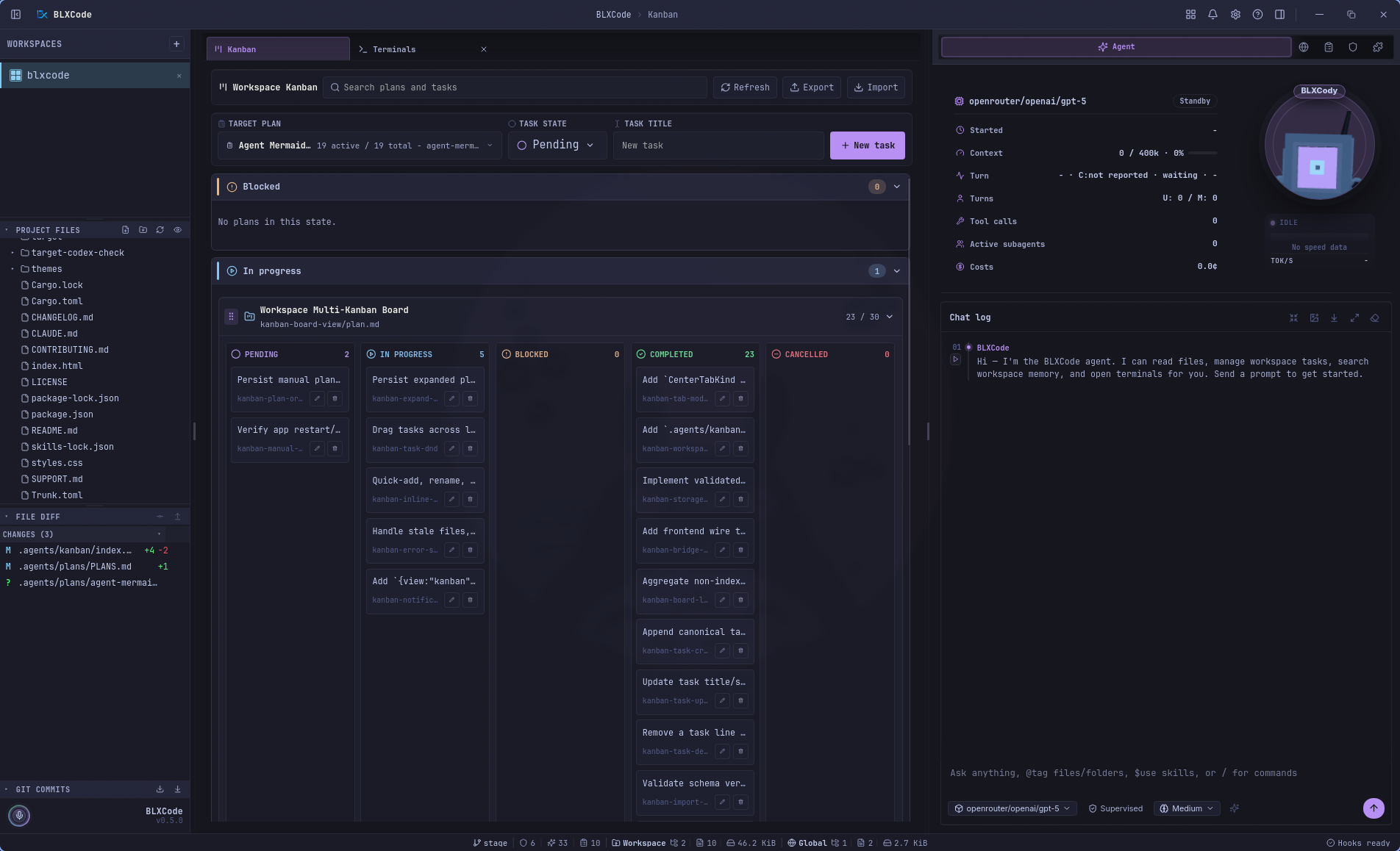
Plans in .agents/plans become a center-tab Kanban board with drag-to-status moves, quick tasks, AI Plan, and AI Tasks.
04
The agent can create persisted plan diagrams, preview them in a gallery, and export them to Markdown or PDF.
05
A background runtime keeps generated memory notes fresh across open workspaces and reports status in Settings.
06
Titlebar notifications, a bottom status line, beta updates, push-to-talk with Whisper, Vim mode, named terminals, and session compaction round out the release.
核心能力
One grid, many providers, MCP tools, plans, memory, voice, and code context.
切换项目而不丢失上下文。
每个工作空间最多 16 个终端 — 并行、共享、集中。
14 种语言环境 — UI、代理和系统副本从英语到繁体中文。
`.agents/plans/` 中的 Markdown 计划包含任务同步、状态过滤器、分组部分和加载到代理中。
侦察、审查和安全分析师并行运行——实时时间线卡、共享提供商和模型。
Shell、Git、工作区搜索和网络研究——懒惰文档、环境检测优先的核心技能。
内存、计划、任务和图像→任何终端插槽或BLXCode代理。
可扩展的规则和技能卡 - 内联编辑、创建规则、核心/用户选项卡、git/npm/local 安装。
左栏中的项目文件树和 git 图表 - 每个工作区刷新、折叠、持久化。
BLXAgent:OpenAI、Anthropic 和 OpenRouter 作为主要提供商。
Claude、Codex、Gemini、Cursor、OpenCode — 并排在网格中。
从您上次中断的地方继续开始工作区和 CLI 会话。
单击侧栏中的任何文件 — 图像、视频、Markdown、Mermaid 和 60 多种代码语言呈现,并带有行号和语法突出显示。
选择一个代码范围,右键单击→将代码片段发送到任何终端,附加到代理,或将其包装在跨工作区的上下文块中。
裸`LICENSE`、`CONTRIBUTING`、`README`、`SECURITY`、`CHANGELOG`(带或不带`.md`)呈现为带有特定于种类的英雄横幅和图标的Markdown。
通过手柄抓住终端插槽并重新排序网格 - PTY、代理标签和分割窗格随之出现,无需重新启动。
BLX代理提供商
CLI 提供商
Multilanguage
UI, agent, and system copy in your language — from English to 繁體中文.
Active locale
Deutsch
de_de.rs
locales/
ADE Workflow
Terminals, browser, memory, plan manager, rules, and skills share one harness. The agent orchestrates; you stay in flow.
node·01
Workspace
node·02
16× Terminals
node·03
BLXAgent
node·04
Browser
node·05
Memory
node·06
Plans
node·07
Skills
node·08
Rules
Switch projects without losing context. Tabs persist.
In the product
Product gallery · 35 views
Auto-advances every few seconds — hover to pause. Click a frame to expand.
Recent workspaces, Create Workspace, and quick destinations for Agent, Memory, Browser, and Kanban.
Pick a local or remote connection, resume recent directories, and start from role-aware session presets.
Sidebar, terminal grid, center tabs, and agent context stay in one workbench.
Run provider CLIs side by side, with up to 16 terminal slots per workspace.
Terminals, previews, settings, memory, and Kanban open as managed center tabs.
Images render in a focused preview stage with metadata and workspace-aware shell chrome.
Markdown and policy docs render inline with syntax-aware previews and readable typography.
README、CHANGELOG、CONTRIBUTORS、CODE_OF_CONDUCT 都有自己翻译的英雄 - 三个打开的选项卡共享工作区 shell。
Right-click a selected code range to send it to a terminal, attach it to the agent, or copy it.
Language, notifications, terminal hooks, app logging, Stable/Beta updates, and titlebar Help in one pane.
Roundings, font controls, dark/light filters, and the full theme grid update the workbench instantly.
OpenRouter、Anthropic、OpenAI、Tavily、Brave、fal.ai 和 Polly 的集中机密 — 一个“保存/放弃”窗格。
Text, image, voice, and web-tool model pickers share one agent configuration surface.
侧边栏、会话和工作区状态恢复时启动启动 - 反闪主题加载。
可折叠侧边栏面板中的项目文件和 commit 历史记录。
按状态过滤计划,浏览被阻止和待处理的工作,并跳转到任何计划文件。
Plan files become a workspace Kanban board with nested task lanes and fast task actions.
Search grouped plans, create tasks quickly, and import or export Kanban layouts.
Agent-authored plan diagrams preview in a centered gallery and export to Markdown or PDF.
将上下文发送到任何实时终端或附加到 BLXCode 代理。
Session stats, context-window meter, tool-call counts, cost, Drobo, and composer stay visible.
Tool activity groups into readable timeline rows with metrics, state, and expandable details.
Structured tool results render as readable cards instead of raw JSON blocks.
Terminal-agent control can pause for explicit user choices without losing the active turn.
Generate images from the agent timeline with inline previews and workspace saves.
Generated memory notes are browsable by category with previews and agent pointers.
Workspace memory can be explored as a spatial graph of modules, notes, and relationships.
Graph note previews can send selected memory context to a terminal or the BLXCode Agent.
Terminals can become canvas nodes with ports while agent stats stay alongside the workflow.
Map the BLXCode Agent to terminal agents and select a running CLI session visually.
One terminal can take the main stage while project files, Git, and agent panels remain available.
The agent can open additional terminal slots and keep them attached to the workspace grid.
Terminal sessions resume with focus outlines, usage popovers, and status-line usage chips.
核心和用户选项卡 - 扩展预览线束文档和切换可用性的技能。
在 Markdown 中创建绑定工作区规则 - 展开卡片、内联编辑、启用切换。
Welcome
BLXCode 代理
代理是 ADE 的编排层:绑定规则、核心技能、协调的子代理、shell 和 Git 工具,以及从计划和任务中恢复 - 然后在需要提供者本机会话时切换到终端和 CLI。屏幕在产品画廊.
每转流量
要求并行侦察、审查或安全运行——每轮最多五次,聊天时间线中的实时可扩展卡片,一个合成回复。
统一工具调度:文件、shell、Git、工作区搜索、Web、内存、计划、规则和技能 - 带有惰性核心技能文档的精简提示。
右侧面板中的可扩展卡 — 展开时预览 SKILL.md、内联编辑规则、创建规则、核心/用户技能选项卡并从 git/npm/local 安装。
使用状态过滤器、分组计划部分、内联创建/编辑和加载到代理中进行编辑和预览。
每个回合都从主动规则开始,在需要时匹配技能,然后在执行工作之前从任务和计划中恢复检测(继续/韦特)。
附上视觉提供者的图像。 STT/TTS 循环和聊天最大化为长代理记录提供了更多空间。
MCP 服务器支持、六个新的代理提供程序(Ollama、LM Studio 等)、工作区看板、代理编写的 Mermaid 图、HeartBeat 驱动的内存索引器、应用程序范围的通知和状态行、Vim 模式、测试版更新通道,以及重新设计的 BLXCode 主题、与本地 Whisper 的一键通、AI 计划、命名终端和自定义跨平台标题栏。
MIT 许可证 · 开源
BLXCode 在 MIT 许可证下是免费的。 Fork 它,扩展它,发送它。