01
MCP server support
Register stdio or HTTP MCP servers in Settings and expose their tools to the in-app agent plus terminal CLI agents.
에이전트 개발 환경
BLXCode 0.5.0 adds MCP servers, local and cloud agent providers, Kanban plans, Mermaid diagrams, HeartBeat memory indexing, push-to-talk, notifications, Vim mode, and 32 themes around one multiworkspace agent loop.
Version 0.5.0
Major ADE upgradeThe latest landing context is centered on the v0.5.0 release: more providers, deeper planning surfaces, background memory services, app-wide status, and a redesigned BLXCode theme without changing the product dark command-center look.
6
new text providers
32
themes
0
key for local Ollama / LM Studio
01
Register stdio or HTTP MCP servers in Settings and expose their tools to the in-app agent plus terminal CLI agents.
02
Ollama, LM Studio, Hugging Face, Cloudflare Workers AI, Together AI, and Portkey join OpenAI, Anthropic, and OpenRouter.
03
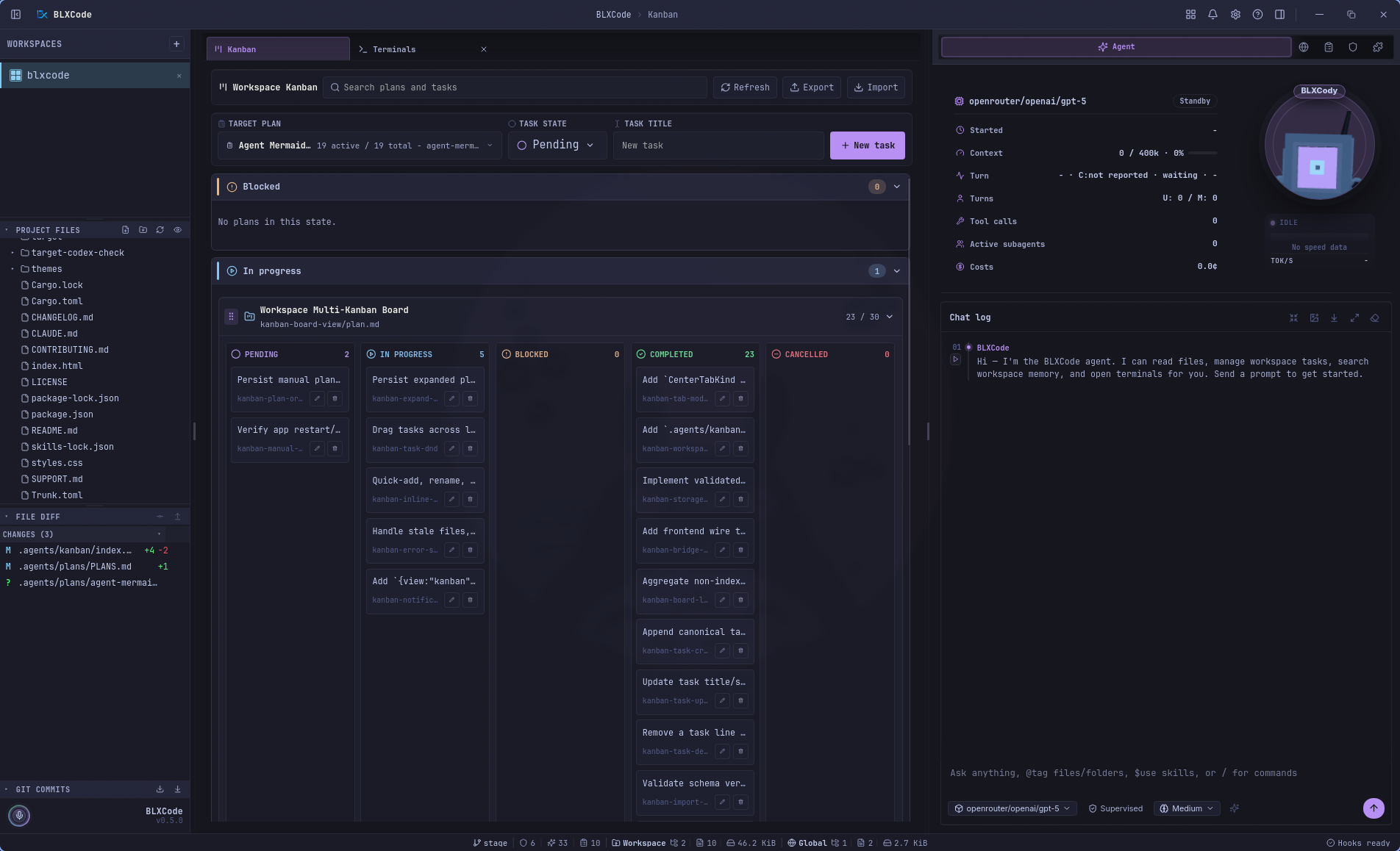
Plans in .agents/plans become a center-tab Kanban board with drag-to-status moves, quick tasks, AI Plan, and AI Tasks.
04
The agent can create persisted plan diagrams, preview them in a gallery, and export them to Markdown or PDF.
05
A background runtime keeps generated memory notes fresh across open workspaces and reports status in Settings.
06
Titlebar notifications, a bottom status line, beta updates, push-to-talk with Whisper, Vim mode, named terminals, and session compaction round out the release.
핵심 역량
One grid, many providers, MCP tools, plans, memory, voice, and code context.
컨텍스트를 잃지 않고 프로젝트를 전환하세요.
작업 공간당 최대 16개의 터미널 — 병렬, 공유, 집중.
14개 로케일 — 영어에서 繁體中文으로 UI, 에이전트 및 시스템 복사.
작업 동기화, 상태 필터, 그룹화된 섹션 및 에이전트에 로드를 포함하는 `.agents/plans/`의 마크다운 계획입니다.
스카우트, 검토 및 보안 분석가는 실시간 타임라인 카드, 공유 공급자 및 모델을 동시에 실행합니다.
Shell, Git, 작업 공간 검색 및 웹 조사 - 게으른 문서를 사용한 핵심 기술, 환경을 먼저 감지합니다.
메모리, 계획, 작업 및 이미지 → 모든 터미널 슬롯 또는 BLXCode 에이전트.
확장 가능한 규칙 및 기술 카드 - 인라인 편집, 규칙 생성, 코어/사용자 탭, git/npm/local 설치.
왼쪽 레일의 프로젝트 파일 트리 및 Git 그래프 — 새로 고침, 축소, 작업 공간별로 유지됩니다.
BLXAgent: OpenAI, Anthropic 및 OpenRouter을 기본 공급자로 사용합니다.
Claude, Codex, Gemini, Cursor, OpenCode — 그리드에 나란히 표시됩니다.
작업공간과 CLI 세션을 정확히 중단한 부분부터 시작하세요.
사이드바에서 파일을 클릭하세요. 이미지, 비디오, Markdown, Mermaid 및 60개 이상의 코드 언어가 줄 번호와 구문 강조 표시로 렌더링됩니다.
코드 범위를 선택하고, 마우스 오른쪽 버튼을 클릭하고 → 스니펫을 터미널로 보내거나, 에이전트에 연결하거나, 작업 공간 전체에서 컨텍스트 블록으로 래핑합니다.
베어 `LICENSE`, `CONTRIBUTING`, `README`, `SECURITY`, `CHANGELOG`(`.md` 포함 또는 제외) 종류별 영웅 배너 및 아이콘을 사용하여 Markdown으로 렌더링합니다.
그립 핸들로 터미널 슬롯을 잡고 그리드 순서를 변경하세요. 다시 시작하지 않고도 PTY, 에이전트 레이블 및 분할 창을 따라갈 수 있습니다.
BLXAgent 공급자
CLI 제공자
Multilanguage
UI, agent, and system copy in your language — from English to 繁體中文.
Active locale
Deutsch
de_de.rs
locales/
ADE Workflow
Terminals, browser, memory, plan manager, rules, and skills share one harness. The agent orchestrates; you stay in flow.
node·01
Workspace
node·02
16× Terminals
node·03
BLXAgent
node·04
Browser
node·05
Memory
node·06
Plans
node·07
Skills
node·08
Rules
Switch projects without losing context. Tabs persist.
In the product
Product gallery · 35 views
Auto-advances every few seconds — hover to pause. Click a frame to expand.
Recent workspaces, Create Workspace, and quick destinations for Agent, Memory, Browser, and Kanban.
Pick a local or remote connection, resume recent directories, and start from role-aware session presets.
Sidebar, terminal grid, center tabs, and agent context stay in one workbench.
Run provider CLIs side by side, with up to 16 terminal slots per workspace.
Terminals, previews, settings, memory, and Kanban open as managed center tabs.
Images render in a focused preview stage with metadata and workspace-aware shell chrome.
Markdown and policy docs render inline with syntax-aware previews and readable typography.
README, CHANGELOG, CONTRIBUTORS, CODE_OF_CONDUCT는 자신만의 번역된 영웅을 얻습니다. 세 개의 열린 탭이 작업 공간 쉘을 공유합니다.
Right-click a selected code range to send it to a terminal, attach it to the agent, or copy it.
Language, notifications, terminal hooks, app logging, Stable/Beta updates, and titlebar Help in one pane.
Roundings, font controls, dark/light filters, and the full theme grid update the workbench instantly.
OpenRouter, Anthropic, OpenAI, Tavily, Brave, fal.ai 및 Polly에 대한 중앙 집중식 비밀 — 하나의 저장/폐기 창.
Text, image, voice, and web-tool model pickers share one agent configuration surface.
사이드바, 세션 및 작업 공간 상태 복원 중 시작 시작 — 플래시 방지 테마 로드.
접이식 사이드바 패널의 프로젝트 파일 및 commit 기록.
상태별로 계획을 필터링하고, 차단된 작업과 보류 중인 작업을 훑어보고, 계획 파일로 바로 이동할 수 있습니다.
Plan files become a workspace Kanban board with nested task lanes and fast task actions.
Search grouped plans, create tasks quickly, and import or export Kanban layouts.
Agent-authored plan diagrams preview in a centered gallery and export to Markdown or PDF.
컨텍스트를 라이브 터미널로 보내거나 BLXCode 에이전트에 첨부하세요.
Session stats, context-window meter, tool-call counts, cost, Drobo, and composer stay visible.
Tool activity groups into readable timeline rows with metrics, state, and expandable details.
Structured tool results render as readable cards instead of raw JSON blocks.
Terminal-agent control can pause for explicit user choices without losing the active turn.
Generate images from the agent timeline with inline previews and workspace saves.
Generated memory notes are browsable by category with previews and agent pointers.
Workspace memory can be explored as a spatial graph of modules, notes, and relationships.
Graph note previews can send selected memory context to a terminal or the BLXCode Agent.
Terminals can become canvas nodes with ports while agent stats stay alongside the workflow.
Map the BLXCode Agent to terminal agents and select a running CLI session visually.
One terminal can take the main stage while project files, Git, and agent panels remain available.
The agent can open additional terminal slots and keep them attached to the workspace grid.
Terminal sessions resume with focus outlines, usage popovers, and status-line usage chips.
핵심 및 사용자 탭 — 기술을 확장하여 하네스 문서를 미리 보고 가용성을 전환합니다.
Markdown에서 바인딩 작업 공간 규칙 만들기 — 카드 확장, 인라인 편집, 토글 활성화.
Welcome
BLXCode 상담원
에이전트는 바인딩 규칙, 핵심 기술, 조정된 하위 에이전트, 셸 및 Git 도구, 계획 및 작업 재개 등 ADE의 오케스트레이션 계층입니다. 그런 다음 공급자 기본 세션이 필요할 때 터미널과 CLI로 전달됩니다. 화면제품 갤러리.
턴별 흐름
병렬 스카우트, 검토 또는 보안 실행을 요청하세요. 턴당 최대 5개, 채팅 타임라인의 실시간 확장 가능 카드, 합성 응답 1개를 요청하세요.
통합 도구 파견: 파일, 셸, Git, 작업 영역 검색, 웹, 메모리, 계획, 규칙 및 기술 - 게으른 핵심 기술 문서가 포함된 슬림한 프롬프트.
오른쪽 패널의 확장 가능한 카드 — 확장 시 SKILL.md 미리보기, 규칙 인라인 편집, 규칙 생성, git/npm/local에서 설치하여 핵심/사용자 기술 탭.
상태 필터, 그룹화된 계획 섹션, 인라인 생성/편집, 에이전트에 로드가 포함된 편집기 및 미리보기입니다.
모든 턴은 활성 규칙으로 시작하여 필요할 때 기술을 일치시킨 다음 작업을 실행하기 전에 작업 및 계획에서 감지(계속/웨이터)를 재개합니다.
비전 제공자를 위한 이미지를 첨부하세요. STT/TTS 루프 및 채팅 최대화는 긴 상담원 대화 내용을 위한 더 많은 공간을 제공합니다.
릴리스 하이라이트
아래 요약은 사이트에 맞게 선별되었습니다. 릴리스에 태그를 지정하면 전체 메모가 GitHub에 게시됩니다. 다음에는 무엇을 배송해야 할까요?아이디어에 올려보세요.
MCP 서버 지원, 6개의 새로운 에이전트 공급자(Ollama, LM Studio 등), 작업 공간 Kanban 보드, 에이전트가 작성한 Mermaid 다이어그램, HeartBeat 기반 메모리 인덱서, 앱 전체 알림 및 상태 표시줄, Vim 모드, 베타 업데이트 채널, 새로 디자인된 BLXCode 테마, 로컬 Whisper와의 푸시 투 토크, AI 계획, 명명된 터미널 및 사용자 정의 크로스 플랫폼 제목 표시줄.
MIT 라이센스 · 오픈 소스
BLXCode은 MIT 라이선스에 따라 무료입니다. Fork 연장하고 배송하세요.