01
MCP server support
Register stdio or HTTP MCP servers in Settings and expose their tools to the in-app agent plus terminal CLI agents.
エージェント開発環境

BLXCode 0.5.0 adds MCP servers, local and cloud agent providers, Kanban plans, Mermaid diagrams, HeartBeat memory indexing, push-to-talk, notifications, Vim mode, and 32 themes around one multiworkspace agent loop.
Version 0.5.0
Major ADE upgradeThe latest landing context is centered on the v0.5.0 release: more providers, deeper planning surfaces, background memory services, app-wide status, and a redesigned BLXCode theme without changing the product dark command-center look.
6
new text providers
32
themes
0
key for local Ollama / LM Studio
01
Register stdio or HTTP MCP servers in Settings and expose their tools to the in-app agent plus terminal CLI agents.
02
Ollama, LM Studio, Hugging Face, Cloudflare Workers AI, Together AI, and Portkey join OpenAI, Anthropic, and OpenRouter.
03
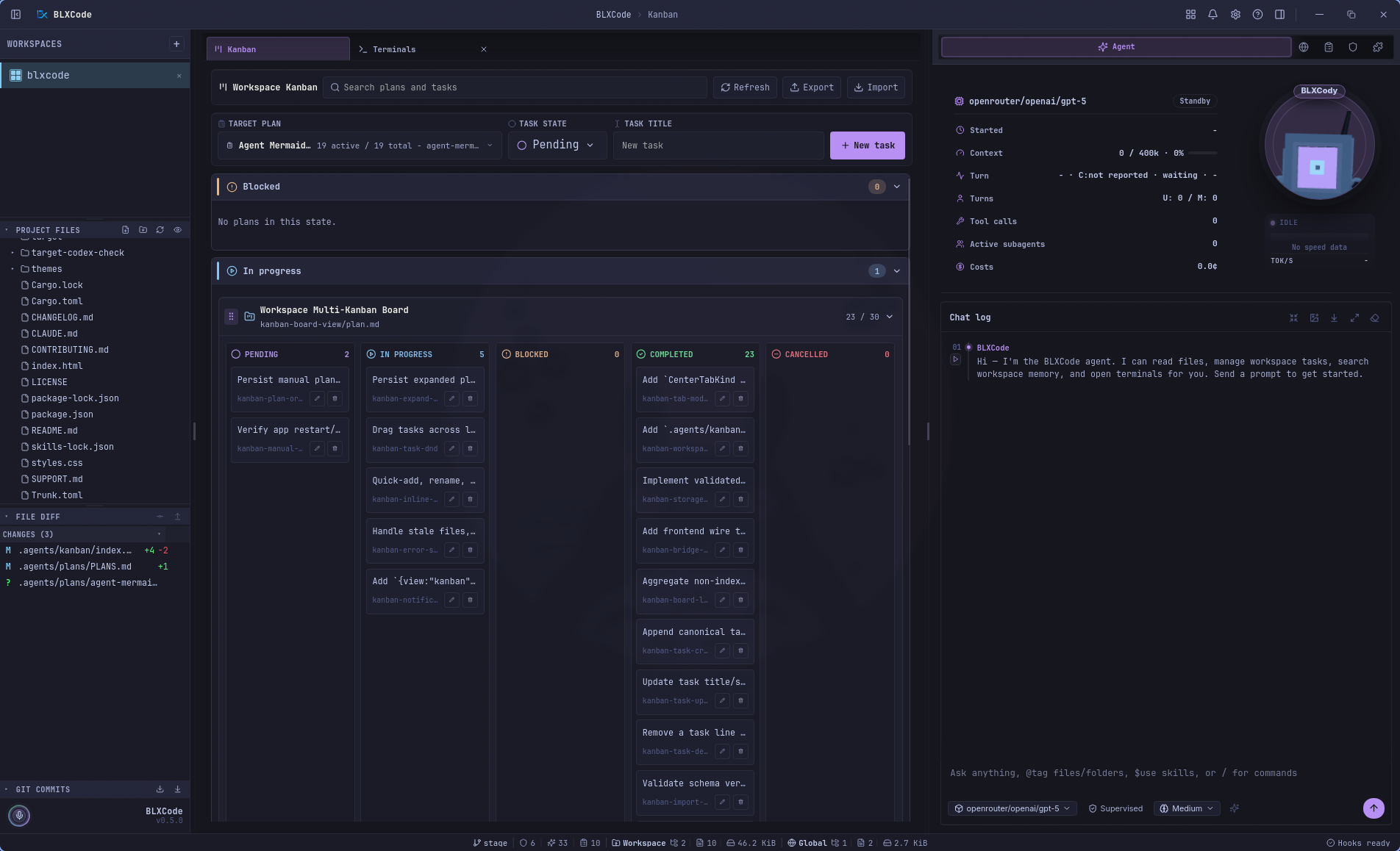
Plans in .agents/plans become a center-tab Kanban board with drag-to-status moves, quick tasks, AI Plan, and AI Tasks.
04
The agent can create persisted plan diagrams, preview them in a gallery, and export them to Markdown or PDF.
05
A background runtime keeps generated memory notes fresh across open workspaces and reports status in Settings.
06
Titlebar notifications, a bottom status line, beta updates, push-to-talk with Whisper, Vim mode, named terminals, and session compaction round out the release.
コア機能
One grid, many providers, MCP tools, plans, memory, voice, and code context.
コンテキストを失うことなくプロジェクトを切り替えます。
ワークスペースあたり最大 16 台の端末 - 並列、共有、集中。
14 のロケール — UI、エージェント、およびシステムは英語から繁體中文にコピーされます。
タスクの同期、ステータス フィルター、グループ化されたセクション、エージェントへのロードを備えた `.agents/plans/` のマークダウン プラン。
スカウト、レビュー、セキュリティ アナリストは、ライブ タイムライン カード、共有プロバイダーとモデルを並行して実行します。
シェル、Git、ワークスペース検索、Web リサーチ - 遅延ドキュメント、環境検出を最初に行うコア スキル。
メモリ、計画、タスク、イメージ → 任意の端末スロットまたは BLXCode エージェント。
拡張可能なルールとスキル カード — インライン編集、ルールの作成、コア/ユーザー タブ、git/npm/local インストール。
左側のレールのプロジェクト ファイル ツリーと git グラフ — ワークスペースごとに更新、折りたたみ、永続化が行われます。
BLXAgent: プライマリ プロバイダーとしての OpenAI、Anthropic、および OpenRouter。
Claude、Codex、Gemini、Cursor、OpenCode — グリッド内に並べて表示されます。
中断したところからワークスペースと CLI セッションを正確に再開します。
サイドバーの任意のファイルをクリックすると、画像、ビデオ、Markdown、Mermaid、および 60 以上のコード言語が行番号と構文の強調表示とともに表示されます。
コード範囲を選択し、右クリック → スニペットを任意の端末に送信するか、エージェントにアタッチするか、ワークスペース全体でコンテキスト ブロックにラップします。
裸の `LICENSE`、`CONTRIBUTING`、`README`、`SECURITY`、`CHANGELOG` (`.md` の有無にかかわらず) は、種類固有のヒーロー バナーとアイコンを使用してマークダウンとしてレンダリングされます。
グリップ ハンドルでターミナル スロットをつかみ、グリッドの順序を変更します。再起動せずに、PTY、エージェント ラベル、分割ペインが続きます。
BLXAgent プロバイダー
CLIプロバイダー
Multilanguage
UI, agent, and system copy in your language — from English to 繁體中文.
Active locale
Deutsch
de_de.rs
locales/
ADE Workflow
Terminals, browser, memory, plan manager, rules, and skills share one harness. The agent orchestrates; you stay in flow.
node·01
Workspace
node·02
16× Terminals
node·03
BLXAgent
node·04
Browser
node·05
Memory
node·06
Plans
node·07
Skills
node·08
Rules
Switch projects without losing context. Tabs persist.
In the product
Product gallery · 35 views
Auto-advances every few seconds — hover to pause. Click a frame to expand.
Recent workspaces, Create Workspace, and quick destinations for Agent, Memory, Browser, and Kanban.
Pick a local or remote connection, resume recent directories, and start from role-aware session presets.
Sidebar, terminal grid, center tabs, and agent context stay in one workbench.
Run provider CLIs side by side, with up to 16 terminal slots per workspace.
Terminals, previews, settings, memory, and Kanban open as managed center tabs.
Images render in a focused preview stage with metadata and workspace-aware shell chrome.
Markdown and policy docs render inline with syntax-aware previews and readable typography.
README、CHANGELOG、CONTRIBUTORS、CODE_OF_CONDUCT は、独自に翻訳されたヒーローを取得します。開いている 3 つのタブがワークスペース シェルを共有します。
Right-click a selected code range to send it to a terminal, attach it to the agent, or copy it.
Language, notifications, terminal hooks, app logging, Stable/Beta updates, and titlebar Help in one pane.
Roundings, font controls, dark/light filters, and the full theme grid update the workbench instantly.
OpenRouter、Anthropic、OpenAI、Tavily、Brave、fal.ai、および Polly のシークレットを 1 つの保存/破棄ペインに一元管理します。
Text, image, voice, and web-tool model pickers share one agent configuration surface.
サイドバー、セッション、ワークスペースの状態を復元する際の起動スプラッシュ — アンチフラッシュ テーマの読み込み。
折りたたみ可能なサイドバー パネルのプロジェクト ファイルと commit 履歴。
ステータスで計画をフィルタリングし、ブロックされている作業や保留中の作業をざっと読み取って、任意の計画ファイルにジャンプします。
Plan files become a workspace Kanban board with nested task lanes and fast task actions.
Search grouped plans, create tasks quickly, and import or export Kanban layouts.
Agent-authored plan diagrams preview in a centered gallery and export to Markdown or PDF.
コンテキストをライブ端末に送信するか、BLXCode エージェントに接続します。
Session stats, context-window meter, tool-call counts, cost, Drobo, and composer stay visible.
Tool activity groups into readable timeline rows with metrics, state, and expandable details.
Structured tool results render as readable cards instead of raw JSON blocks.
Terminal-agent control can pause for explicit user choices without losing the active turn.
Generate images from the agent timeline with inline previews and workspace saves.
Generated memory notes are browsable by category with previews and agent pointers.
Workspace memory can be explored as a spatial graph of modules, notes, and relationships.
Graph note previews can send selected memory context to a terminal or the BLXCode Agent.
Terminals can become canvas nodes with ports while agent stats stay alongside the workflow.
Map the BLXCode Agent to terminal agents and select a running CLI session visually.
One terminal can take the main stage while project files, Git, and agent panels remain available.
The agent can open additional terminal slots and keep them attached to the workspace grid.
Terminal sessions resume with focus outlines, usage popovers, and status-line usage chips.
[コア] タブと [ユーザー] タブ — スキルを展開してハーネス ドキュメントをプレビューし、可用性を切り替えます。
Markdown でバインディング ワークスペース ルールを作成します。カードを展開し、インラインで編集し、有効に切り替えます。
Welcome
BLXCode エージェント
エージェントは ADE のオーケストレーション層であり、バインディング ルール、コア スキル、調整されたサブエージェント、シェルと Git ツール、およびプランとタスクからの再開を行い、プロバイダー ネイティブ セッションが必要な場合は端末と CLI にハンドオフします。の画面製品ギャラリー.
ターンごとの流れ
並行してスカウト、レビュー、またはセキュリティ ランを依頼します。ターンごとに最大 5 枚まで、チャット タイムラインにライブ拡張可能なカードが表示され、合成された 1 つの返信が表示されます。
統合ツールディスパッチ: ファイル、シェル、Git、ワークスペース検索、Web、メモリ、プラン、ルール、スキル — 遅延コアスキルドキュメントを備えたスリムなプロンプト。
右側のパネルの展開可能なカード — 展開時の SKILL.md のプレビュー、ルールのインライン編集、ルールの作成、git/npm/local からのインストールによるコア/ユーザー スキル タブ。
ステータス フィルターを備えたエディターとプレビュー、グループ化されたプラン セクション、インライン作成/編集、エージェントへのロード。
すべてのターンはアクティブなルールから始まり、必要に応じてスキルを照合し、作業を実行する前にタスクと計画から検出を再開します (継続/ウェイター)。
ビジョンプロバイダー用の画像を添付します。 STT/TTS ループとチャットの最大化により、長いエージェントのトランスクリプトを保存する余地がさらに広がります。
リリースのハイライト
以下の概要はこのサイト用に厳選されたものです。リリースにタグを付けると、完全なメモが GitHub に公開されます。次に何を出荷する必要がありますか?アイデアに落とし込む.
MCP サーバーのサポート、6 つの新しいエージェント プロバイダー (Ollama、LM Studio など)、ワークスペース カンバン ボード、エージェント作成のマーメイド ダイアグラム、HeartBeat 駆動のメモリ インデクサー、アプリ全体の通知とステータス ライン、Vim モード、ベータ アップデート チャネルに加え、再設計された BLXCode テーマ、ローカル Whisper によるプッシュツートーク、AI プラン、名前付きターミナル、およびカスタム クロスプラットフォーム タイトルバー。
MIT ライセンス · オープンソース
BLXCode は MIT ライセンスに基づいて無料です。 Fork それを拡張し、出荷します。